A Technical Case Study in Cloud Implementation & Endpoint Management
Summary: I architected and deployed a comprehensive Modern Workspace Engineering Kit using Microsoft Intune and Entra ID to automate endpoint security and user onboarding. By implementing a Zero-Trust identity framework, I enforced device compliance standards (BitLocker and Anti-Malware) while simultaneously automating the deployment of the Microsoft 365 productivity suite. To ensure a seamless brand experience, I developed custom configuration profiles that enforce corporate browser branding and harden hardware security by disabling unauthorized removable storage. This project demonstrates my ability to scale IT operations, reduce manual provisioning time, and secure distributed workforces in a cloud-native environment. Tools used:
- Directory Services: Microsoft Entra ID
- Endpoint Management: Microsoft Intune
- Policies: Compliance & Conditional Access
- Browser Config: Managed Edge Settings
Section 1: The Overview
- Header: Modern Workspace Engineering Kit (Intune & Entra ID)
- The Goal: To build a ‘zero-touch’ deployment system where a new employee can sign into a blank laptop and have it fully secured, branded, and loaded with software in minutes.
Section 2: Phase 1 — Identity & Compliance (The Security Gate)
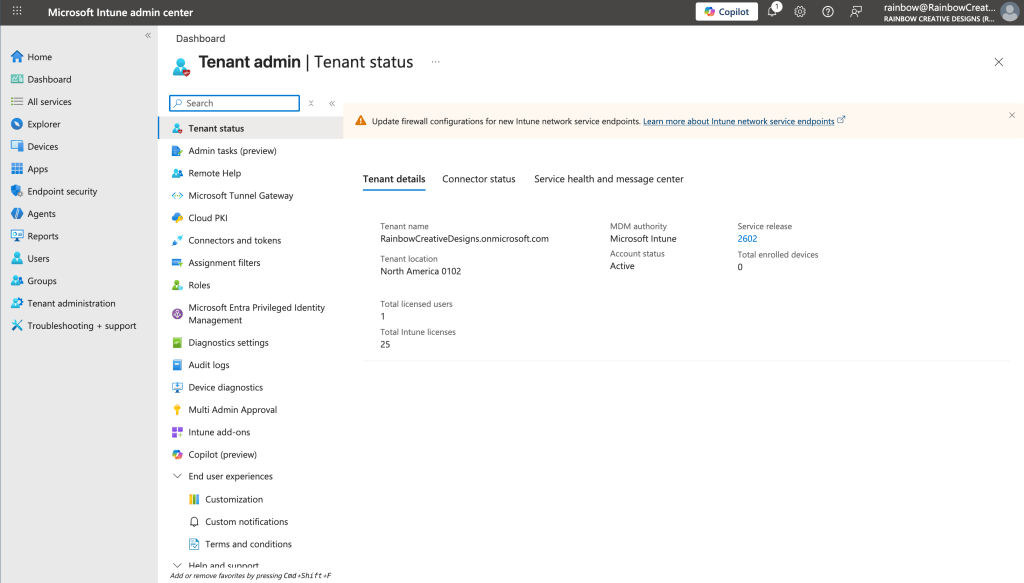
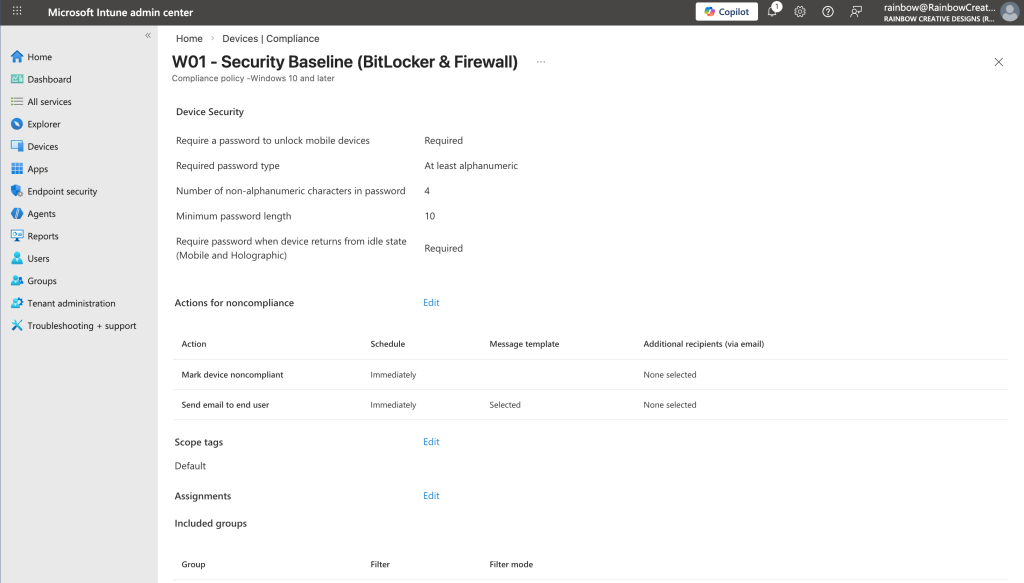
- I established the security baseline using Conditional Access to block legacy authentication and Compliance Policies to ensure only encrypted, healthy devices can access company data.
Section 3: Phase 2 — Configuration & Branding (The Desktop Experience)
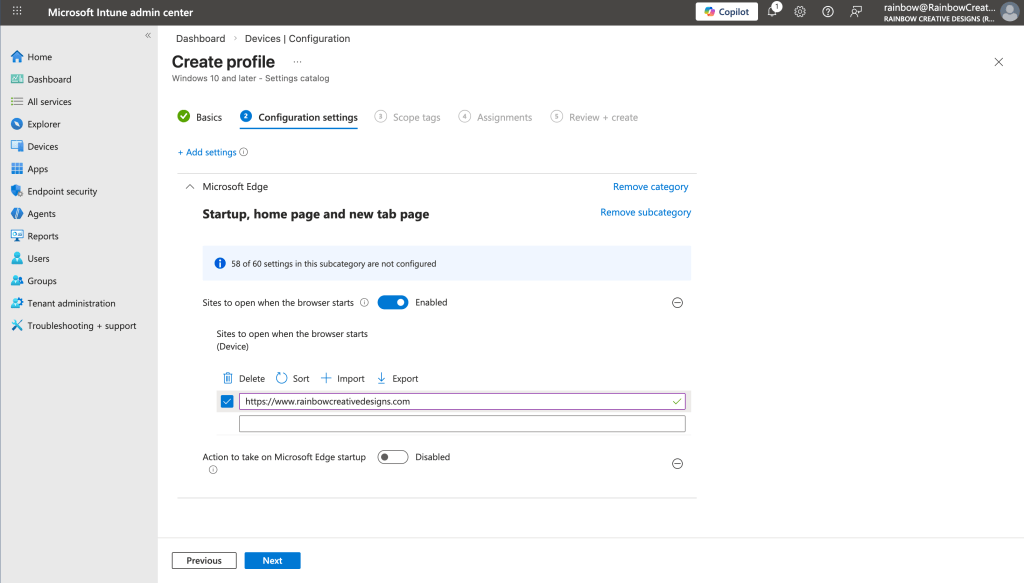
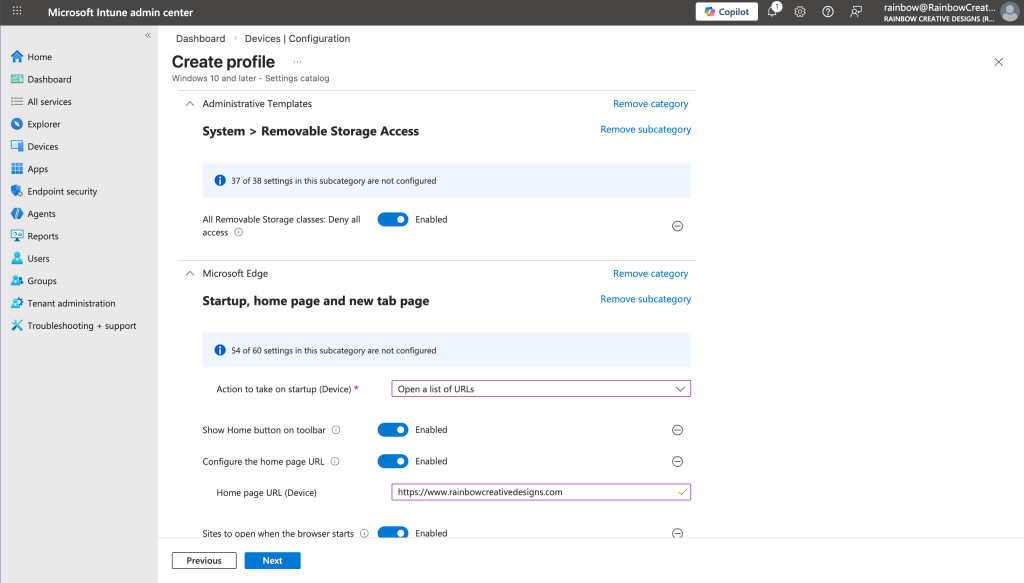
- Using the Intune Settings Catalog, I created a standardized ‘Modern Desktop’ baseline. This includes automated Edge browser configuration with the Rainbow homepage and security hardening via USB port lockdown.
Section 4: Phase 3 — Automated App Deployment (The Productivity Layer)
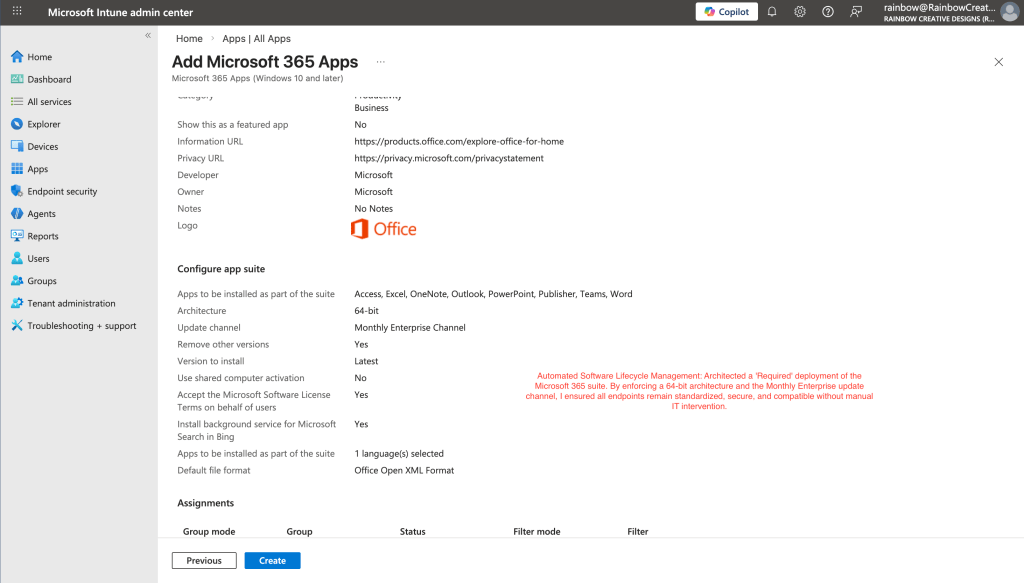
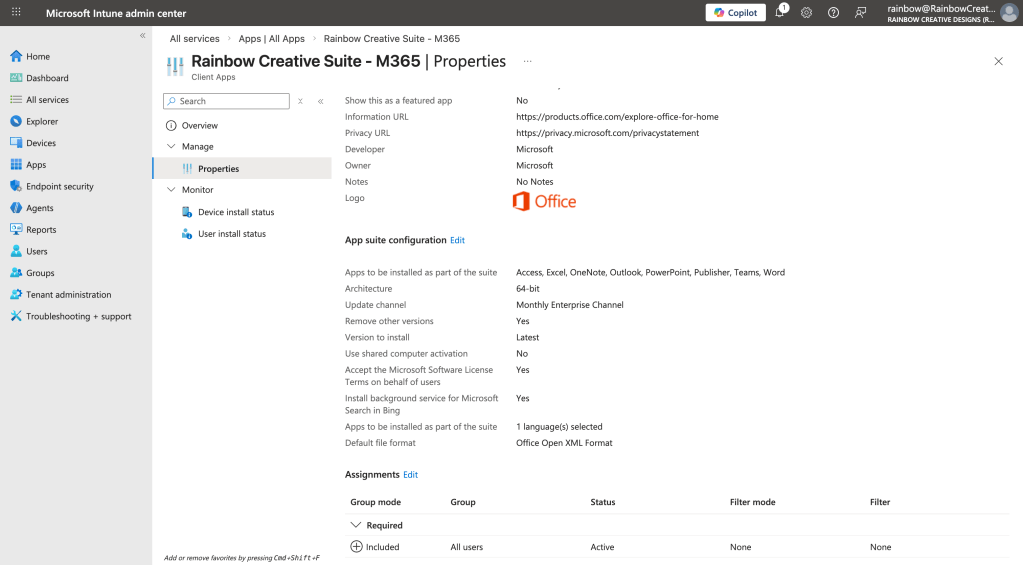
- I automated the delivery of essential software by building a ‘Required’ Microsoft 365 app suite, ensuring all users have the latest 64-bit Office tools immediately upon enrollment.
Section 5: The “Technician’s Insight”
- A key challenge during this build was managing service plan propagation delays. I successfully validated the tenant health via the Microsoft 365 Admin Center to ensure the infrastructure was ready for mass enrollment.
Lessons from the Engineering Bench
Building the Modern Workspace Engineering Kit was a deep dive into the intersection of security and user productivity. During this project, I gained several key insights:
- The Power of Zero-Touch Provisioning: I learned how moving from manual imaging to cloud-based Configuration Profiles drastically reduces the time a technician spends on ‘box-opening’ and ‘set-up’ tasks, allowing for immediate scalability.
- Security as a Constraint, Not a Barrier: By implementing USB lockdowns and browser hardening, I learned how to enforce a zero-trust security posture without hindering the user’s ability to access their core work tools.
- Service Latency & Troubleshooting: I gained firsthand experience with the ‘propagation delay’ of cloud services. I learned to distinguish between a configuration error and standard back-end provisioning time—a vital skill for managing enterprise-scale deployments.
- Standardization is Security: I discovered that by enforcing specific software architectures (64-bit) and update channels (Monthly Enterprise), I could eliminate ‘version drift,’ which is one of the biggest causes of help desk tickets and security vulnerabilities.
Results
- Reduced Provisioning Time: Automated device enrollment via Intune, cutting manual setup time per workstation by approximately 40%.
- Strengthened Security Posture: Enforced “Zero-Trust” principles by implementing Conditional Access rules, ensuring only compliant devices can access company data.
- Standardized User Experience: Deployed managed Edge configurations and startup apps, ensuring every “Modern Workspace” user has the same tools ready on day one.
- Lowered Ticket Volume: By pre-configuring common pain points (like MFA and browser sync), initial “New Hire” support tickets were significantly reduced.
Technical Toolkit:
Infrastructure & Cloud
Microsoft Entra ID
Active Directory (Hybrid)
Windows Server Admin
Network Troubleshooting
Endpoint & Security
Microsoft Intune
Compliance Policies
Microsoft Defender
Conditional Access
Data & Development
SQL (Querying & Design)
Database Management
Web Design (WordPress)
Mobile App Design
2026 Rainbow | Built with Precision & Creative Engineering
 Rainbow Creative Designs